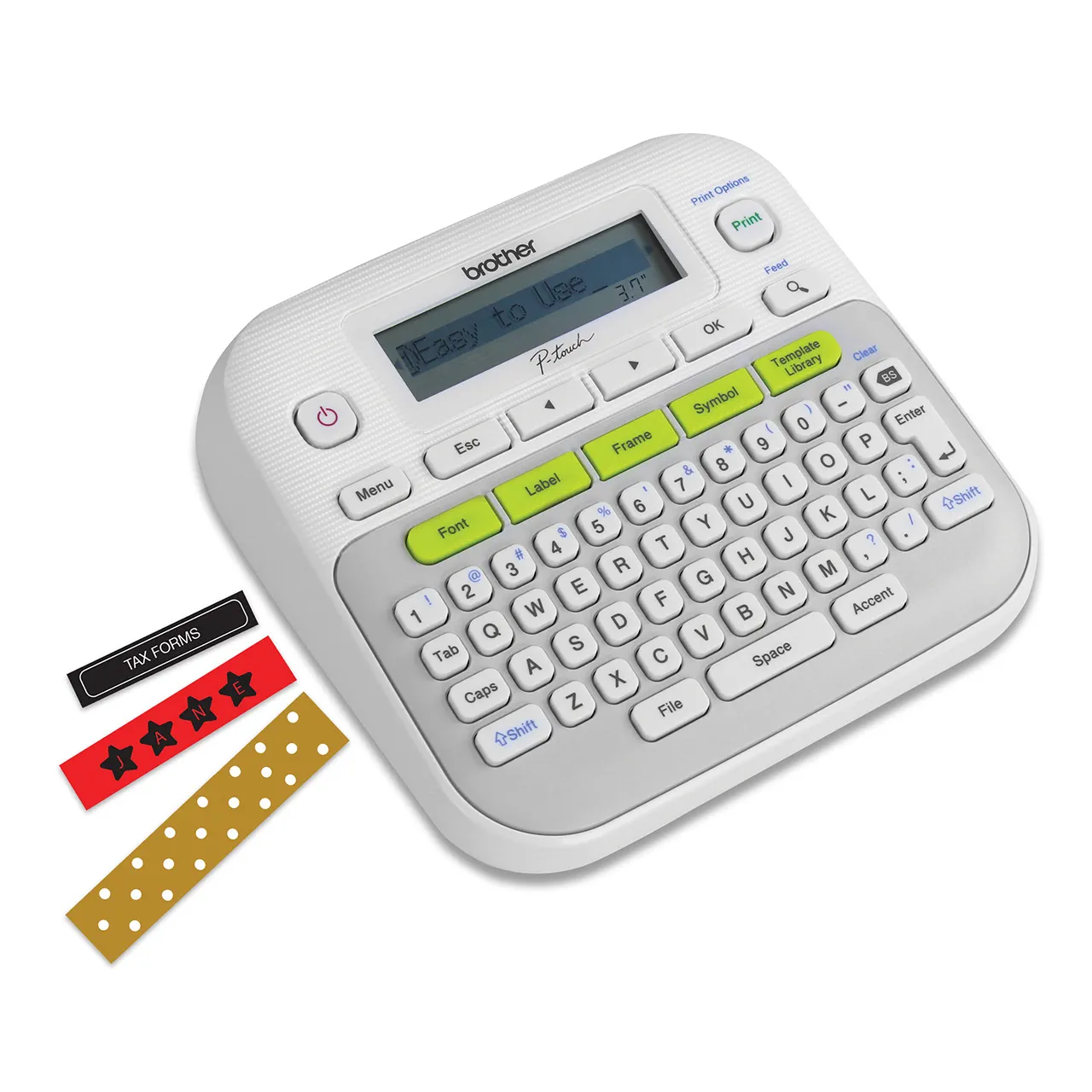

PORTABLE Label Machine BUYER'S GUIDE

Why a Labeller? No-more lost books Affordable label maker Stress-free Back to School No -more mixed up belongings Easy-to-use label maker

Discover the GetStuff.co.za Label Maker range—designed to make organizing simple and stress-free. From school supplies and home essentials to office files and cables, Brother label printers offer versatile solutions for every need. Create durable, water-resistant labels with ease using intuitive designs, customizable fonts, and built-in templates. Compact, portable, and built to last, these label makers are perfect for busy parents, professionals, and DIY enthusiasts. Simplify your life with Brother and GiCom—your trusted partners in organization!

Get Started

See the Brother Label Maker Range More Information and FAQ

  • Cleaning Detergents
  • Computers and Accessories
  • Mobile Accessories
  • Office and Stationery
  • Personalised Items
  • Printers and Consumables
  • Retail Electronics
  • Specials
    •   Back
    • Earbuds
    • Headphones
    • Karaoke
    • Speakers
    • Cameras
    • Bluetooth Trackers
    • Batteries
    • Chargers
    • Projectors
    • Money Handling
    •   Back
    • Laptop Bags
    • Keyboards & Mice
    • Docking Stations
    • Laptops
    • Cables & Adapters
    • Gaming Accessories
    • Portable Monitors
    • Scanners
    • Storage Devices
    • Point of Sale
    • Power Protection
    • Flash Drives
    • External Hard Drives
    • Flash Drives
    • Memory Cards
    • Solid State Drives
    •   Back
    • Chargers
    • Power Banks
    •   Back
    • Halloween Mugs
    • Christmas Mugs
    • Graduation Mugs
    •   Back
    • Laminators
    • Label Printers
    • Desk Accessories
    • Tables
    • Label Accessories
    • Laminating
    • Shredders
    • Office Safes
    •   Back
    • Ecotank Printer
    •   Back
    • Flash Drives
    • External Hard Drives
    • Flash Drives
    • Memory Cards
    • Solid State Drives
    •   Back
    • Printers
    • Ink & Toner
    • Paper & Printing
    • Ecotank Printer

FAQ

Frequently Asked Questions

Label printing refers to the process of creating adhesive labels or tags for identifying and organizing items. Label printers are specialized devices designed to print text, graphics, barcodes, or other information on label materials. They are widely used for personal, commercial, and industrial purposes, such as organizing school supplies, labeling files, or creating barcodes for inventory management. Modern label printers like the Brother and GiCom ranges offer durable, customizable labels for various applications.

  • Brother 110: Operates with 6 AAA batteries.
  • Brother 210: Can be powered by an AC adapter or 6 AAA batteries for portability.
  • GiCom Multifunction: Includes a rechargeable battery with USB charging capability.
  • Brother 110: Compatible with TZe label tapes up to 12mm wide. Labels are water-resistant and fade-proof.
  • Brother 210: Uses TZe tapes up to 18mm wide, offering durable, laminated labels ideal for various applications.
  • GiCom Multifunction: Supports a wide range of tapes (up to 24mm), including water- and oil-resistant labels and barcode printing.
  • Brother 110: Offers basic customization with a few font options and symbols.
  • Brother 210: Features multiple fonts, symbols, frames, and advanced formatting options.
  • GiCom Multifunction: Extensive customization, including preloaded templates and multiple font styles.
  • Brother 110: No connectivity options available.
  • Brother 210: No connectivity options; standalone use only.
  • GiCom Multifunction: Yes, supports Bluetooth and can be controlled via a dedicated mobile app.

All models offer durable labels, but specific details differ:

  • Brother TZe tapes are highly durable, water-resistant, and fade-proof.
  • GiCom tapes also provide water- and oil-resistant properties, suitable for heavy-duty applications.
  • Brother 110: Limited preview capability on a basic LCD screen.
  • Brother 210: Allows label preview on a larger LCD screen.
  • GiCom Multifunction: Provides advanced preview options through the app
  • Brother 110: Lightweight and handheld; ideal for portability.
  • Brother 210: Slightly larger, suited for both portable and desktop use.
  • GiCom Multifunction: Compact and ergonomic; designed for portability.
  • Brother 110 and 210: Typically include a starter tape cartridge, user manual, and the label maker itself. AC adapter is optional for the 210.
  • GiCom Multifunction: Usually comes with a USB charging cable, starter tape, and the printer.
  • Brother 110: Stores up to 15 label designs in memory.
  • Brother 210: Offers memory for multiple designs depending on label complexity.
  • GiCom Multifunction: Storage capabilities depend on the connected app.
  • Brother TZe tapes range from (R250–R370) per roll, depending on size and type.
  • GiCom-compatible tapes are generally more affordable but vary in durability and brand availability.

The Right Label-Maker for you

Brother 110 Personal Handheld

Target Audience

Personal use, Students, and basic labelling

Design

Compact and Lightweight

Display

Basic LCD

Keyboard

QWERTY-style Keyboard

Label Tape Compatibility

6mm, 9mm, 12mm tapes

Customisation Options

Limited font and style choices

Durability of Labels

Water-resistant and fade-proof

Power Source

6 AAA batteries

Connectivity

None

Additional Features

Affordable and beginner friendly

R 1099 00
Limited time Offer
Uses TZ231 Tapes

Brother D210 Home and Office

Target Audience

Home and Small Office Organisation

Design

Slightly Larger, Desktop Compatible

Display

1-line LCD with Preview Capability

Keyboard

FULL QWERTYKeyboard

Label Tape Compatibility

6mm, 9mm, 12mm and 18mm tapes

Customisation Options

Wide Range of fonts, frames and symbols

Durability of Labels

High Durability, Water-resistant and scratch-proof

Power Source

AC Adapter or 6 AAA batteries

Connectivity

None

Additional Features

Advanced Formatting

R 1295 00
Limited time Offer
Uses TZ231 Tapes

GiCom Multifunction Handheld

Target Audience

General users with multifunction needs

Design

Handheld, ergonomic, and portable

Display

Large Display

Keyboard

Touch keyboard with Navigation

Label Tape Compatibility

6mm, 9mm, 12mm and 18mm tapes

Customisation Options

Extensive with preloaded templates

Durability of Labels

High Durability, Water-resistant and scratch-proof

Power Source

Rechargable Battery or Mains

Connectivity

USB - Cable not provided

Additional Features

Advanced Formatting

R 1339 00
Limited time Offer
Uses TZ231 Tapes
  • All
  • Cleaning Detergents
  • Computers and Accessories
  • Mobile Accessories
  • Office and Stationery
  • Personalised Items
  • Printers and Consumables
  • Retail Electronics
  • Specials
    •   Back
    • Earbuds
    • Headphones
    • Karaoke
    • Speakers
    • Cameras
    • Bluetooth Trackers
    • Batteries
    • Chargers
    • Projectors
    • Money Handling
    •   Back
    • Laptop Bags
    • Keyboards & Mice
    • Docking Stations
    • Laptops
    • Cables & Adapters
    • Gaming Accessories
    • Portable Monitors
    • Scanners
    • Storage Devices
    • Point of Sale
    • Power Protection
    • Flash Drives
    • External Hard Drives
    • Flash Drives
    • Memory Cards
    • Solid State Drives
    •   Back
    • Chargers
    • Power Banks
    •   Back
    • Halloween Mugs
    • Christmas Mugs
    • Graduation Mugs
    •   Back
    • Laminators
    • Label Printers
    • Desk Accessories
    • Tables
    • Label Accessories
    • Laminating
    • Shredders
    • Office Safes
    •   Back
    • Ecotank Printer
    •   Back
    • Flash Drives
    • External Hard Drives
    • Flash Drives
    • Memory Cards
    • Solid State Drives
    •   Back
    • Printers
    • Ink & Toner
    • Paper & Printing
    • Ecotank Printer

Choosing the Right Label Printer: A Comprehensive Guide

Label printers are invaluable tools for staying organized, whether you’re labeling school supplies, organizing your office, or managing inventory. With numerous options on the market, how do you choose the right one? Here’s a step-by-step guide to help you make an informed decision.


1. Understand Your Labeling Needs

The first step in choosing a label printer is identifying how and where you’ll use it. Consider the following:

  • Personal Use: For tasks like labeling jars, school supplies, or small home projects, a simple, portable label printer like the Brother 110 Personal Handheld Label Printer suffices.

  • Home Office or Small Business: For more advanced labeling needs, such as file organization or product labeling, opt for a versatile model like the Brother 210 Home and Small Office Label Printer.

  • Professional Use: If you require features like barcode printing or Bluetooth connectivity, consider a multifunction label printer such as the GiCom Multifunction Handheld Label Printer.


2. Key Features to Look For

Not all label printers are created equal. Evaluate the following features to find the best fit:

a) Label Customization

  • Fonts and Styles: Models like the Brother 210 offer a wide range of fonts, frames, and symbols, while basic models like the Brother 110 are limited in customization.

  • Tape Width: Check the maximum tape width supported. For example, the Brother 110 supports up to 12mm, while the GiCom printer supports tapes up to 24mm.

b) Connectivity Options

  • Stand-Alone Operation: Basic models like the Brother 110 and 210 don’t require additional devices.

  • Bluetooth Connectivity: The GiCom Multifunction Handheld Label Printer offers app-based controls, ideal for advanced customization.

c) Power Source

  • Battery-operated models like the Brother 110 are great for portability.

  • Models like the Brother 210 offer both battery and AC adapter options, ensuring flexibility.

  • Rechargeable options like the GiCom printer eliminate the need for disposable batteries.

d) Durability of Labels

  • If you need weatherproof and long-lasting labels, look for printers compatible with durable tapes, such as Brother’s TZe laminated tapes.


3. Set Your Budget

Price is a critical factor. Here’s a general breakdown:

  • Basic Models: R600-R1000 for simple labeling tasks.

  • Advanced Models: R950-R1850 for more features and versatility.

  • High-End Models: R1850 for connectivity and professional-grade features.


4. Check Reviews and Compatibility

Research user reviews to gauge reliability and ease of use. Additionally, ensure the printer supports readily available and affordable label tapes.


5. Tips for Long-Term Savings

  • Choose Cost-Effective Tapes: Opt for printers compatible with generic tapes, which are often cheaper.

  • Invest in Rechargeable Models: Save on battery costs by choosing a model with a rechargeable battery, like the GiCom Multifunction.


Final Thoughts

Selecting the right label printer boils down to your specific needs, budget, and the features most important to you. Whether you’re a parent labeling school supplies or a business owner managing inventory, there’s a label printer that fits your needs perfectly.

With models like the Brother 110, Brother 210, and GiCom Multifunction available, you’re sure to find a reliable tool to streamline your organization efforts. Take the time to evaluate your options, and happy labeling!

Important links

Customer Spotlight

Reseller Programs

Careers

Company

Projects

Team Member

Customer Care Contact

info@getstuff.co.za ( 24 Hours a Day)

Customer Care (Office Hours) +27 73 772 773 5

© 2023 Powered by the Insala Six Group